


Jar Systems Elevate USB-C Charging Cart for Schools
The JAR Systems Elevate USB-C Charging Cart (SKU: MC-6032-EDU) delivers an elite, intelligent power orchestration infrastructure designed explicitly to solve the daily device deployment chaos across modern K-12 school districts, technology labs, and multi-classroom academies. Moving far past legacy charging cart configurations that rely on a tangled maze of proprietary physical brick adapters, the Elevate cart integrates a universal Quick-Sense USB-C charging hub architecture natively into its industrial-grade steel framing. This specialized multi-port distribution system automatically analyzes the active power draw of up to 32 individual devices simultaneously, optimizing delivery across connected endpoints to ensure full fleet readiness between classroom periods while preventing dangerous electrical circuit overloads.
Engineered to maximize institutional return on investment and drastically minimize campus IT payroll hours, the MC-6032-EDU eliminates the traditional "cable installation nightmare" during initial fleet deployment. The cart arrives completely pre-wired from the factory with rugged, high-tensile USB-C connectors routed precisely to each dedicated plastic device slot, allowing tech coordinators to drop devices straight onto the shelves and begin immediate quick-charging out of the box. By streamlining the physical connection loop down to a single, universally compatible cable, schools wipe out the common operational costs associated with misplaced student power adapters, broken charging pins, and unorganized power bays.
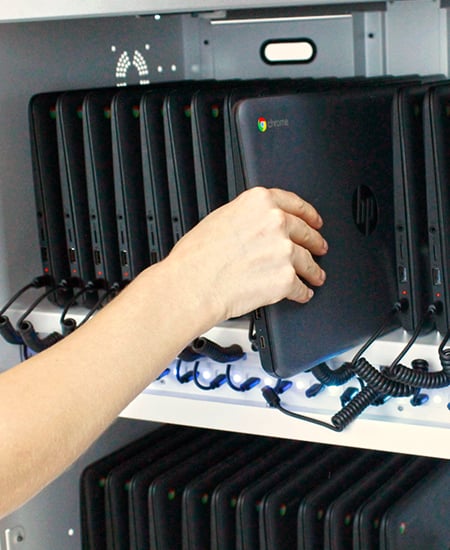
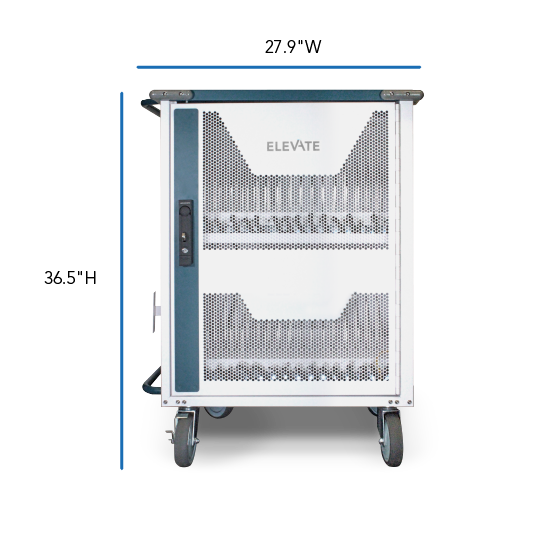
Security, ventilation, and mobile agility are fully maximized within the Elevate cart's compact, space-conscious footprint. Featuring front and rear double-panel locking doors constructed from heavy-gauge perforated steel, the cart provides 24/7 physical theft protection and passive heat dissipation during rapid charging cycles without risking equipment degradation. Equipped with 4-inch professional-grade non-marring swivel casters and an integrated steel directional handle, the mobile lab transitions smoothly across campus hallways, doorways, and flooring thresholds—establishing a secure, transportable technology vault that maximizes asset tracking and student access.
JAR Systems Elevate MC-6032-EDU Core Technical Attributes & Operational Uses
| Deployment Category | Technical Attributes, Multi-Device Compatibility & Instructional Use Cases |
|---|---|
| Intelligent Power Management |
|
| Universal Device Compatibility |
|
| Primary Educational Uses |
|
| Best Practices for Campus IT Admins |
|
JAR Systems Elevate MC-6032-EDU Technical Fit & Physical Specifications
To ensure a flawless deployment across your campus facilities, the Elevate cart balances a highly heavy-duty steel structural envelope with a tight mobility footprint. Review the exact physical clearances, load weights, and dimensional slot boundaries below to verify compatibility with your classroom layout and existing laptop chassis configurations.
| Specification Sector | Official Measurement Data | IT Deployment Parameters & Clearance Context |
|---|---|---|
| Exterior Cart Dimensions | 36.5″ H × 27.9″ W × 20.9″ D | Total outer dimensions include the side-mounted steel directional push handles and heavy-duty structural wrap bumpers. Fits through all standard standard ADA school doorways cleanly. |
| Chassis Structural Weight |
|
Industrial-grade steel framing provides excellent stability. Arrives factory-assembled on a secure shipping skid with only handles and casters requiring quick technical installation. |
| Mobile Wheel Base | 5-inch Professional Casters | Equipped with 4 commercial-grade non-marring swivel casters. Features 2 locking brake wheels to firmly anchor the cart stationary when students plug in devices. |
| 🎯 Dynamic Device Size Compatibility & Slot Configurations | ||
| Max Device Size (32-Bay Setup) | Up to 10.5″ H × 0.875″ W × 14.25″ D | The default factory deployment footprint. Accommodates up to 32 standard 11.6-inch to 14-inch student Chromebooks or slim tablets concurrently. |
| Max Device Size (24-Bay Reconfig) | Up to 10.5″ H × 1.25″ W × 14.25″ D | Adjusting the removable internal metal dividers expands slot width to accommodate thick ruggedized military-grade student armor cases and protective shell bumpers. |
| Max Device Size (20-Bay Reconfig) | Up to 10.5″ H × 1.5″ W × 14.25″ D | Provides maximum width clearance for oversized workstation laptops, mobile keyboard attach-docks, or specialized high school CTE media engineering tablets. |
💡 Recommended Campus Deployment Add-ons 💡
🌐 Fleet Security Optimization: Centralized Domain License Provisioning
While your JAR Systems cart handles physical power delivery and hardware asset tracking, pairing your new 32-device fleet with perpetual Google Chrome OS Management Console for Education unlocks absolute cloud administration. Embedding these digital management tokens directly into your district domain allows your IT department to silently enforce security group policies, push standardized curriculum applications, configure tamper-proof locked kiosk testing modes, and track hardware lifecycles directly through a single web console.
⚡ Capital Protection: Shielding Mobile Hardware from Campus Grid Surges
School computer labs and campus electrical grids frequently endure massive voltage fluctuations caused by building HVAC kickovers, regional lightning strikes, and facility grid shifts. Connecting 32 high-value laptops directly to building outlets without an industrial-grade backup line leaves your hardware open to mainboard failure. We highly recommend routing your cart's main input line through a heavy-duty, commercial **Surge Suppressor or Power Conditioning Module** to shield your device investments from erratic grid behavior.
⏰ Battery Longevity: Implementing Smarter Charging Schedules
Leaving lithium-ion laptop batteries pinned at 100% capacity under continuous AC wall voltage throughout long holiday breaks or weekends can accelerate cell degradation and shorten a Chromebook's operational life. To protect your district's massive hardware investments, we recommend routing your cart's main power input cable through an external, heavy-duty Mechanical Outlet Timer or a Commercial Smart Power Distribution Unit (PDU). Setting an automated calendar schedule to cut the wall power completely over weekends and turn back on just a few hours before Monday morning classes begin preserves long-term battery health and lowers district energy consumption across your entire campus.


