


Avanquest AMS Clipify PRO for Windows (Download)
Avanquest Clipify PRO – Windows Intelligent Video Editing and Filmmaking Software
Avanquest Clipify PRO is a dedicated Windows system utility designed to splice, stabilize, and export digital video files cleanly without requiring extensive video production experience. This practical software tool provides an efficient solution for university public relations offices, secondary school multimedia centers, and student training labs needing to assemble high-definition lecture captures, local sporting event highlights, and digital student portfolios cleanly. By compiling raw footage clips in real time on an optimized multi-track editing grid, this utility allows instructors and students to insert smooth transitions, layer background music tracks, and apply dynamic speed adjustments that standard basic video editors leave unmapped. This direct assembly setup eliminates technical friction, protecting high-volume video project files and keeping local digital content production moving forward fluidly.
By combining automatic smart video stabilization filters with an extensive library of creative transitions, this utility simplifies complex multimedia editing tasks. Users can easily fix shaky handheld footage tracks, sync microphone voiceovers to specific video frames, and apply custom text title card overlays across their local system profiles. When an export task is launched, the optimized software engine checks the target layout criteria, manages hardware multi-core processing priority layers cleanly, and renders the final video file without causing interface lag loops in your other active programs. This straightforward workflow makes it easy to preserve legacy institutional media records, build professional student filmmaking submissions, and distribute vibrant video assets across school networks at full efficiency.
Multi-track video sequencing, color grading, and multi-user project staging are managed through a centralized dashboard layout that provides immediate access to all production modules. This background utility core monitors audio balance tracks, traces dynamic keyframe modulations, and passes rendering commands directly to the operating system kernel with complete stability. This setup allows technical teams, network administrators, and classroom operators to preview video compression values, apply cinematic lookup table filters, and convert raw camera footage into standard MP4, AVI, or mobile device configurations instantly. The lightweight digital software footprint installs quickly onto standard desktop computers or laptop drives, ensuring your creative video staging and file preservation tasks are straightforward and reliable.
Key Features include:- 🔌 Native Windows 10 & 11 Fleet Optimization: Advanced software architecture engineered to operate flawlessly as a native video processing utility across your campus computing networks.
- 📐 Advanced Multi-Track Video Timeline: High-utility production workspace designed to let operators layer raw footage, independent audio tracks, voiceovers, and text layers concurrently cleanly.
- 🌬️ Real-Time Shaky Video Stabilization: Intelligent background filtering module custom-calibrated to analyze and smooth out unstable handheld camera movements and tracking paths effortlessly.
- 💥 150+ Cinematic Transitions and Special FX: Curated repository pre-loaded with comprehensive visual blending tools, crossfades, and artistic movie filters for immediate project expansion.
- 🎙️ Split-Audio Ripping and Voiceover Capture: High-velocity sound recording engine built to separate native clip audio tracks while permitting immediate live microphone narration overlay tracking fluidly.
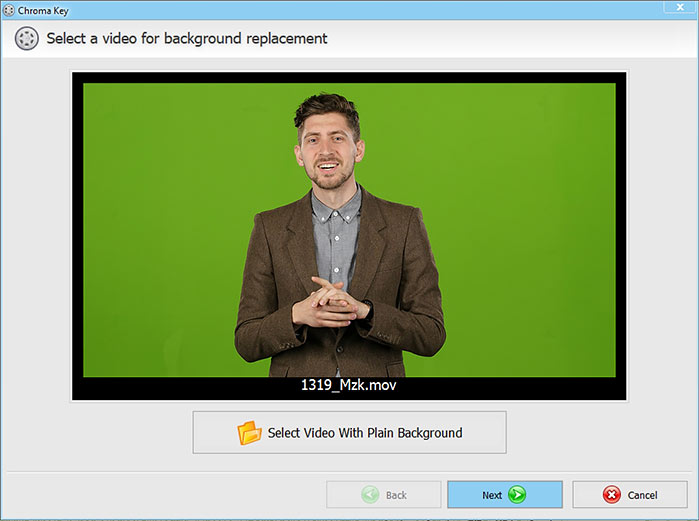
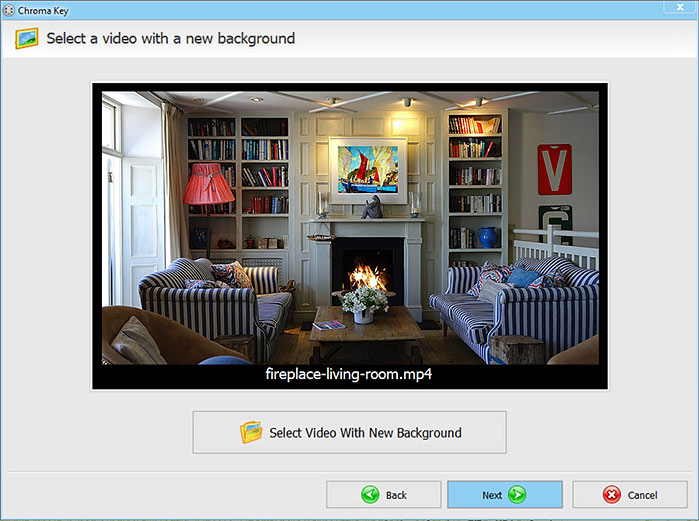
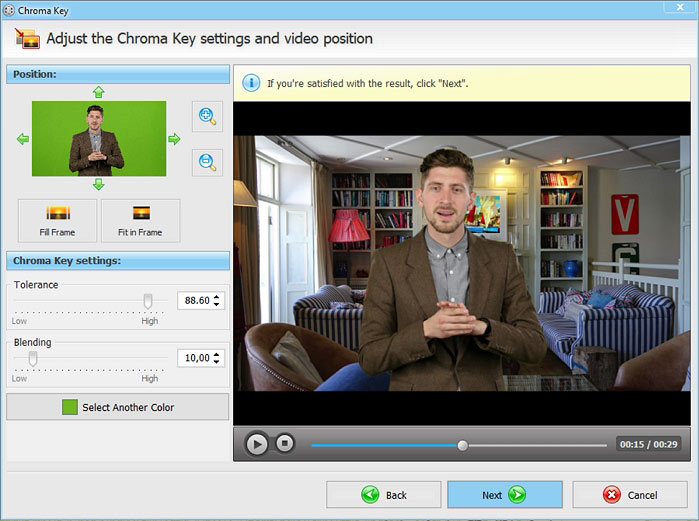
- ✂️ Precision Cutting and Smart Video Chroma Key: Advanced alignment panel engineered to let students execute frame-accurate cuts and seamlessly replace solid green screen backdrops cleanly.
- 🖥️ Custom Multi-Tab Status Dashboard Layout: High-resolution central management screen custom-calibrated to deliver immediate timeline feedback, clip duration metrics, and rendering progress reports clearly.
- 🌐 Multi-Format Ultra-HD Export Engine: High-overhead conversion terminal configured to export finished movies into standard high-definition web, mobile, burning disc, or streaming video formats cleanly.
Specifications:
| Specification | Details |
|---|---|
| Brand | Avanquest (AMS Software Division) |
| Model / SKU Configuration | Clipify PRO / SKU: 11567-E / Digital Download Tier |
| Device Classification | Digital High-Definition Video Editing, Multi-Track Sequencing, and Movie Production Software Utility Application |
| Core Curricular Domain | Video Journalism / Digital Media Production / AV Filmmaking / Institutional Communications Curation |
| Supported Operating Systems | Microsoft Windows 11, Windows 10, Windows 8, and Windows 7 (64-Bit / 32-Bit Environments) |
| Available Interface Ports | None (Intangible cloud-delivered digital license matching natively onto host Windows computing nodes or local media folders) |
| Fulfillment Management | Instantaneous Post-Checkout Avanquest Activation Portal Digital License Delivery Link Code |
| Compliance Vetting | RoHS Material Compliant / W3C Content Protected / Multi-Core CPU Rendering Vetted Standard Criteria |
💡 PRO TIP #1: CAPTURE CLEAR NARRATION VIA EXTERNAL DESKTOP USB MICROPHONES! 💡
Checking the factory packaging reveals that while this premium digital filmmaking application provides multi-track audio sequencing and live voiceover record overlays, physical sound capture microphones or high-utility audio cables are entirely left out of the digital download folder directory. Attempting to record voice commentaries, execute documentary narrations, or track clear interview components standalone using just your computer's built-in laptop micro node leaves your audio timeline heavily distorted with room echo and computer fan hum bleedover. To achieve an uncompromised sound field right from installation hour across your hardware, we highly recommend matching your order with a standard Professional Cardioid USB Condenser Microphone. Hooking a dedicated recording microphone directly into your native USB ports expands your audio definition depth instantly, allowing you to track crisp dialogue with complete system efficiency.
💡 PRO TIP #2: EXPORT AND TRANSPORT MOVIES VIA HIGH-CAPACITY FLASH DRIVES! 💡
Unboxing this downloadable movie editing software reveals an extensive toolset for folder-wide video compilation, but an easy physical backup option or mobile transport tool is completely missing from your download directory. Exporting finished high-definition MP4 movies generates massive data footprints that are far too large to share via email attachments or standard messaging channels. To bypass online data limits and immediately share your finished student short films, lecture captures, or news broadcast projects with absolute security, we highly recommend adding a Premium High-Capacity USB Flash Drive to your checkout basket. Fastening a high-velocity physical memory drive allows you to save and transport your heavy video creations seamlessly to any standard laptop, desktop terminal, or presentation kiosk without relying on unstable internet lines.


)